
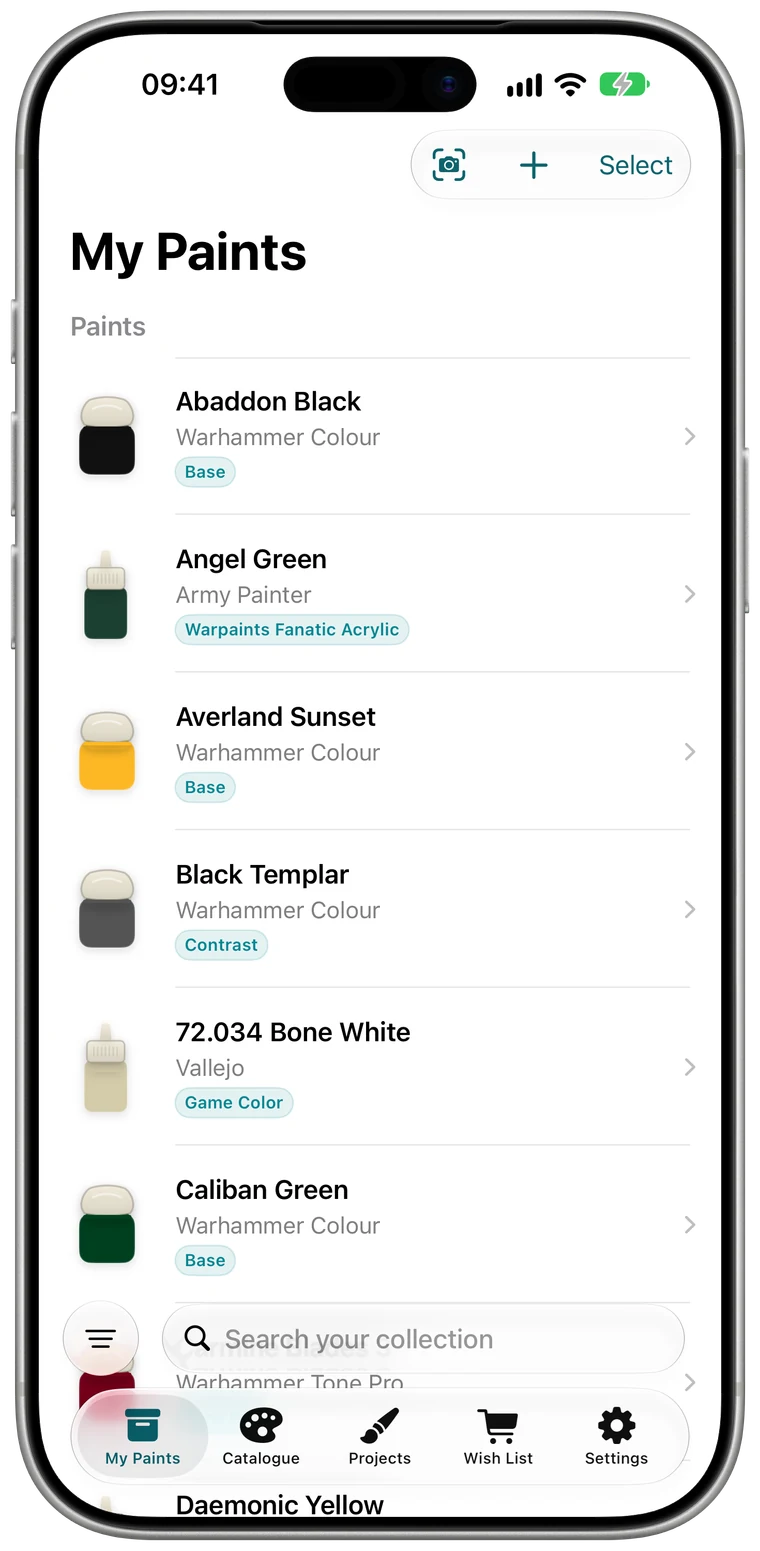
Scan paint labels
Point the camera at a label, review the likely result, then add the paint without typing its name or code.
The modern hobby tracker
Track your paints, Wish List and projects in one beautifully simple place.
Stay organised. Get inspired. Paint more.
Core tools
Hobby Rack keeps the practical parts of paint planning close at hand without pretending every colour has a perfect equivalent.
Point the camera at a label, review the likely result, then add the paint without typing its name or code.
Start with paints you already own, prioritising trusted published conversions and verified colour data where available.
Begin with a Painting Method Template, then keep required paints, chosen alternatives and shopping needs together.
Keep My Paints, your Wish List and every project backed up and available across your devices with iCloud.
Real hobby workflows
Hobby Rack is built around the little moments that happen at the desk, on the sofa with a tutorial open, or in a shop aisle trying to remember what you already own.
Search the paint from the video or article, then check useful alternatives from your rack before adding another pot to the wish list.
Save tutorial paints and your alternatives to a project plan so the same decision is ready next time you return to that army, display piece, or terrain set.
Use the camera scanner to recognise paint labels and add likely catalogue matches to My Paints without retyping everything.
New in Hobby Rack 1.4.3
Version 1.4.3 introduces Painting Method Templates, expands the paint catalogue, and refines matching, scanning, collection management, wish lists, and project planning.
Start with Classic, Contrast / Speedpaint or Custom. Hobby Rack Plus adds five more ready-made project templates.
Browse Pro Acryl, Scale75, Darkstar Miniatures and expanded AK Interactive coverage with improved search and grouping.
Scanner feedback, collection filters, alternatives, wish lists and project shopping lists are clearer and more reliable.
Why I built it
I built Hobby Rack because I was tired of pausing a project to dig through paint maker websites and conversion charts, trying to work out what I could use instead of the exact colours in a YouTube tutorial.
For a while, that made me feel locked into one paint brand. It was easier than figuring out alternatives across different ranges, even when another maker had paints I preferred or colours with better coverage.
I tried looking for a better way to manage a mixed paint collection, but the tools I found either felt overwhelming or did not fit the way I actually paint. So I built the app I wanted on my own desk: a quick way to see what I already have, find practical alternatives, and keep painting instead of waiting until I could buy the exact pot from the tutorial.
Screenshots
Hobby Rack Plus
Plus adds extra Painting Method Templates, unlimited projects, project-specific paint alternatives, and iCloud sync while keeping everything you create available if your subscription ends.
Templates create ready-made project sections. They do not include painting lessons or tutorials.
Matching philosophy
Paint matching is practical guidance, not a guarantee of exact colour equivalence. Hobby Rack prioritises trusted published conversion sources and only uses strict colour matching where verified data exists.
Now on iPhone and iPad
Start building your collection, wish list, and project paint plans today.
FAQ
No. They are practical alternatives, prioritising published conversion charts and trusted swatch data where available.
Yes. If you do not use an airbrush, Hobby Rack can hide Air paints so your catalogue and matches stay relevant.
Plus adds iCloud sync and backup, unlimited projects, extra Painting Method Templates, and project-specific paint alternatives.
Yes. You can save tutorial paint lists, choose alternatives from your own rack, and keep project shopping lists for paints you still need.